
Smart Meal Planner Bundle | Printable PDF
$15.00
Buy nowSecure checkout by Lemon Squeezy
- Category
- Printables & Planners
- Files
- 2 files (PDF, XLSX)
- Delivery
- Instant download
About this product
Most meal planners give you a blank page and wish you luck.
This bundle gives you two tools that work together:
The spreadsheet does the math. Pick your meals, and it builds your grocery list, removes what you already own and shows what the month will cost.
The printable PDF keeps you on track. Stick the weekly plan on the fridge, take the grocery list to the store and tick off your prep on Sunday.
Plan on your laptop. Follow it on paper.
How it works
Set up once: enter your budget and your local grocery prices.
Plan the month: pick meals from a dropdown.
Shop from the list: it's built for you, minus what's already in your kitchen.
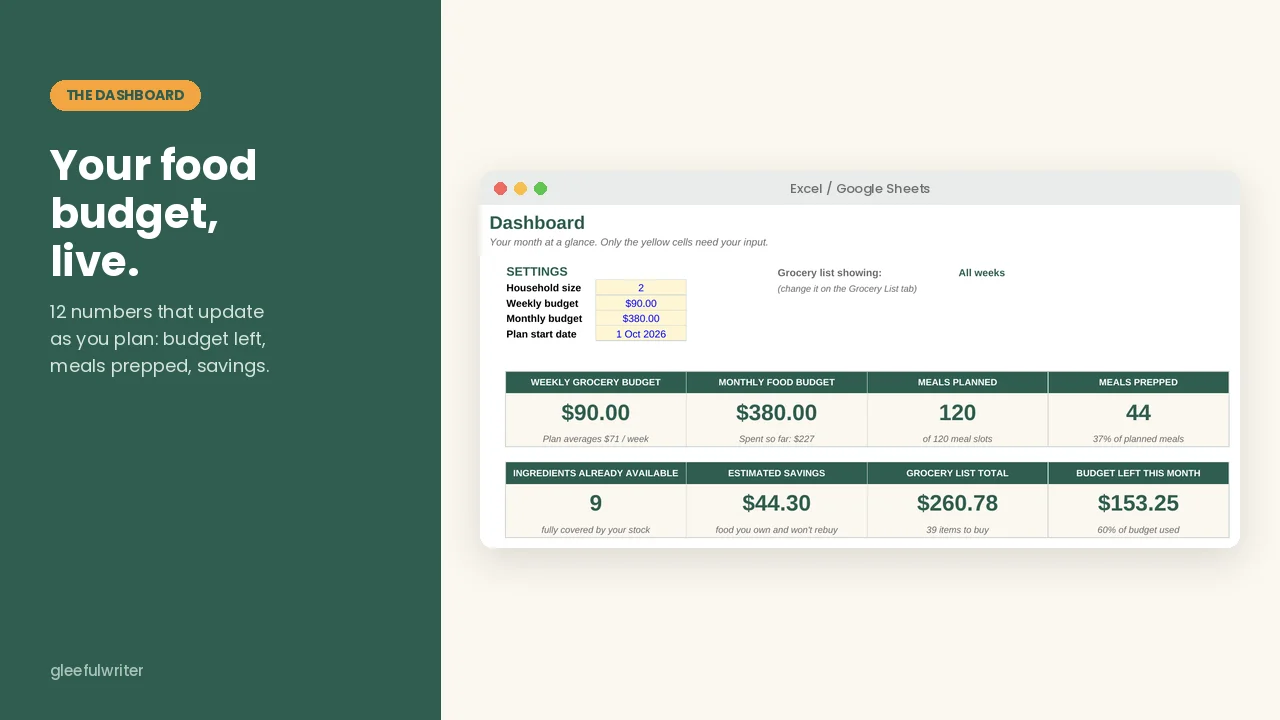
Track as you go: the dashboard shows what you've spent and what's left.
What You Get
Automated spreadsheet (Excel + Google Sheets)
Budget dashboard: 12 numbers that update as you plan.
30-day meal plan: a dropdown for every meal, with the cost of each day.
Grocery list that builds itself: view the whole month or one week at a time.
"Use What You Have" planner: meals you can cook right now without shopping.
Pantry and freezer inventory: flags food that's about to expire.
Leftover and spending trackers: includes a 12-month spending chart.
Recipe cards: scaled to your household size.
Printable + fillable PDF (27 pages, A4 and US Letter)
Weekly pages: 5 meal planners and 5 grocery lists.
Planning pages: a 30-day calendar and a meal-prep checklist.
Tracking pages: budget, pantry, freezer and leftover trackers.
Meal pages: recipe cards, plus 18 quick meals for busy days.
Bonus: 30 budget-friendly meals, included in both.
Why the bundle beats buying one
The spreadsheet alone calculates everything, but you still need something in your hand at the store and in the kitchen.
The PDF alone keeps you organized, but you do the math yourself.
Together: the spreadsheet plans, and the paper keeps you on track.
The PDF alone costs $9. The bundle adds full automation for $10 more.
Built for you if:
Your grocery spending surprises you every month.
You buy food with good intentions and throw half of it away.
Deciding what to cook drains you more than the cooking.
Not for you if:
You want a decorative planner to look at.
You won't spend 15 minutes on setup.
Straight talk: this won't cut your food bill by itself. It shows you where the money goes and makes it easy to eat what you already bought. The saving comes from using it.
FAQ
Do I need Excel skills?
No. You type only in the yellow cells, and everything else is automatic.
Does it work in Google Sheets?
Yes. There are no macros or add-ons.
Can I use my own recipes?
Yes. The setup guide shows you how.
I'm outside the US. Will it work?
Yes. Enter your local prices. The PDF comes in A4 and US Letter.
Can I fill in the PDF on my iPad?
Yes, in most PDF apps. Browser viewers may not save what you type.
What's the license?
Personal use only. Print the pages as often as you like, but please don't share or resell the files.
Plan once. Shop once. Waste less.
Most meal planners give you a blank page and wish you luck.
This bundle gives you two tools that work together:
The spreadsheet does the math. Pick your meals, and it builds your grocery list, removes what you already own and shows what the month will cost.
The printable PDF keeps you on track. Stick the weekly plan on the fridge, take the grocery list to the store and tick off your prep on Sunday.
Plan on your laptop. Follow it on paper.
How it works
Set up once: enter your budget and your local grocery prices.
Plan the month: pick meals from a dropdown.
Shop from the list: it's built for you, minus what's already in your kitchen.
Track as you go: the dashboard shows what you've spent and what's left.
What You Get
Automated spreadsheet (Excel + Google Sheets)
Budget dashboard: 12 numbers that update as you plan.
30-day meal plan: a dropdown for every meal, with the cost of each day.
Grocery list that builds itself: view the whole month or one week at a time.
"Use What You Have" planner: meals you can cook right now without shopping.
Pantry and freezer inventory: flags food that's about to expire.
Leftover and spending trackers: includes a 12-month spending chart.
Recipe cards: scaled to your household size.
Printable + fillable PDF (27 pages, A4 and US Letter)
Weekly pages: 5 meal planners and 5 grocery lists.
Planning pages: a 30-day calendar and a meal-prep checklist.
Tracking pages: budget, pantry, freezer and leftover trackers.
Meal pages: recipe cards, plus 18 quick meals for busy days.
Bonus: 30 budget-friendly meals, included in both.
Why the bundle beats buying one
The spreadsheet alone calculates everything, but you still need something in your hand at the store and in the kitchen.
The PDF alone keeps you organized, but you do the math yourself.
Together: the spreadsheet plans, and the paper keeps you on track.
The PDF alone costs $9. The bundle adds full automation for $10 more.
Built for you if:
Your grocery spending surprises you every month.
You buy food with good intentions and throw half of it away.
Deciding what to cook drains you more than the cooking.
Not for you if:
You want a decorative planner to look at.
You won't spend 15 minutes on setup.
Straight talk: this won't cut your food bill by itself. It shows you where the money goes and makes it easy to eat what you already bought. The saving comes from using it.
FAQ
Do I need Excel skills?
No. You type only in the yellow cells, and everything else is automatic.
Does it work in Google Sheets?
Yes. There are no macros or add-ons.
Can I use my own recipes?
Yes. The setup guide shows you how.
I'm outside the US. Will it work?
Yes. Enter your local prices. The PDF comes in A4 and US Letter.
Can I fill in the PDF on my iPad?
Yes, in most PDF apps. Browser viewers may not save what you type.
What's the license?
Personal use only. Print the pages as often as you like, but please don't share or resell the files.
Plan once. Shop once. Waste less.
What's included
- 30-Day_Smart_Meal_Planning_System_A4.pdfPDF
- Smart_Meal_Planner_Grocery_Budget_Dashboard.xlsxXLSX